Start your 3-day free trial
Sign up to experience all premium features at no cost.
*Available only to new users. Each user is limited to one trial.

Seeing Adobe Firefly unavailable does not identify a single problem. First separate a country restriction from an account or license problem, then distinguish a generation error from a page that cannot connect. Adobe describes these as different conditions, so changing networks is not a substitute for checking eligibility. [1][2]
Key Takeaways
- Record the exact entry point and error before changing settings.
- Country eligibility, organizational licenses, and model access are separate checks.
- Credits or temporary model capacity can explain a failed generation.
- Stop at an explicit restriction; investigate connectivity only for permitted use.
Start with the screen you actually used: the Firefly website, a mobile app, or a Firefly-powered feature inside a Creative Cloud application. Adobe distinguishes the standalone website from the wider model family and integrated features. An error from one surface does not establish that every Adobe product is unavailable. [1]
Write down the app name, feature name, model selected, time with time zone, and the error text. Keep this as a short private note. You do not need to publish your email address, account identifiers, client files, or an image of an entire account page to diagnose the issue.
Use the moment of failure to choose the next check:
| What happens | First question | Useful next check |
|---|---|---|
| A message explicitly mentions country or region | Does this exact feature permit your location? | Its official availability guidance |
| You can sign in but a feature is locked | Does this account have the required entitlement? | Account profile and assigned license |
| The page works but generation fails | Are credits, terms, or model capacity involved? | Error text and generation troubleshooting |
| The interface is blank or never finishes loading | Does the browser meet requirements? | Browser version, JavaScript, then connectivity |
| Only an organization-managed machine fails | Is its access or configuration restricted? | Your administrator's guidance |
This table is a diagnostic order, not a claim that each symptom has only one cause. For example, a blank interface can coexist with an unsupported account. Resolve the explicit condition first and retest the same small task afterward.
If you are comparing several services, the AI access restrictions guide explains why account, feature, and location checks need separate evidence. For the broader habit of defining a task and verifying its result, return to the beginner's AI workflow.
Open Adobe's Firefly FAQ and the help page for the feature you intend to use. At the source check for this article, the FAQ explicitly listed Russia, Belarus, and China among locations where Firefly is unavailable, alongside broader restrictions on Adobe services in other jurisdictions. Use the full official guidance for your circumstances rather than treating these examples as an exhaustive list. [1]
A translated interface is not evidence that the service is offered in the place where that language is spoken. The technical requirements page lists interface languages separately from access conditions. Likewise, reaching an Adobe marketing page does not demonstrate permission to run a generative feature. [1][4]
Read availability together with the exact product name. A list attached to a desktop feature, an enterprise integration, or a partner model should not be copied into a universal Firefly country list. If two official pages appear inconsistent, preserve both URLs and ask Adobe to clarify which conditions apply to your account and feature.
When traveling, give support your actual location and the relevant account context. Do not invent an address or change account details merely to make an error disappear. A different displayed country or network endpoint does not itself establish legitimate eligibility.
Stop condition: if the applicable policy excludes your location or use, stop the access troubleshooting. Select a service you are permitted to use, or wait for an official change. Paying for a subscription before resolving this question can leave the underlying restriction unchanged.
Once the location check permits use, confirm that you are signed in with the intended Adobe ID. For Firefly-powered features within Creative Cloud apps, Adobe also requires an active entitlement to genuine software with approved use. The desktop application opening successfully is therefore an incomplete test of the generative service. [1]
With a work or school account, identify the profile you selected and ask the administrator which license was assigned. Adobe says Shared Device Licenses cover desktop applications rather than services such as Firefly; its guidance directs affected users to their administrator about a named user or Adobe Express license. [3]
A useful support question is specific: “This account can open the desktop application, but this named Firefly feature is unavailable. Does the assigned license include that service?” This gives the administrator something concrete to verify without asking them to interpret a vague complaint that “Adobe is blocked.”
Also identify the requested feature and model. Adobe's known limitations page gives Prompt to Edit as an example of a feature requiring premium model access. An available image-generation option does not prove that every editing or partner-model option is included. Check the current requirements before changing a plan. [3]
Keep billing and technical decisions separate. First establish the missing entitlement, then review official plan information if an upgrade is actually necessary. Do not share passwords, verification codes, payment information, or unredacted license screenshots with someone offering to unlock your account.
When the interface loads and a request reaches generation, record the specific message. Adobe identifies insufficient generative credits, noncompliance with applicable terms, and model capacity limits as distinct reasons content generation may fail. Credits reset according to the plan's billing date; capacity problems can include partner providers. [2]
| Error category | Appropriate response | What it does not prove |
|---|---|---|
| Insufficient credits | Review your balance and plan reset information | A national service restriction |
| Model at capacity or request timeout | Pause; consider another permitted model if suitable | That buying more credits fixes capacity |
| Terms or account restriction | Read the notice and use official support | A browser reset grants permission |
| One premium feature unavailable | Check that feature's entitlement | Every Firefly tool is inaccessible |
Avoid repeatedly submitting a valuable client file while you investigate. Use a harmless text-only request when the selected tool supports it, and check whether a previous job completed before starting another. This keeps the troubleshooting task simple and reduces confusion about which attempt produced an output.
If you test another model, label the comparison accurately. Success with a different model narrows the problem to a feature or provider combination; it does not guarantee identical output, licensing conditions, or suitability for the original assignment. Review the resulting work using the same AI photo-editing verification habits.
For an eligible account without an explicit policy or credit error, compare your environment with Adobe's technical requirements. The website requires JavaScript; Adobe also says Safari Lockdown mode is unsupported. Check the current supported browser and operating-system versions rather than relying on a browser merely being installed. [4]
Do not disable an organization's protections or a security mode simply to make the page load. If the required browser configuration conflicts with your security needs, use an approved compatible device or consult the administrator. A successful clean-profile test is evidence about that browser configuration, not permission to remove safeguards everywhere.
If AethoVPN is already part of your permitted connection setup, note whether the failure occurs with it connected or disconnected while holding the Adobe profile and model constant; that comparison addresses the connection path, not a Firefly license or country entitlement. The VPN troubleshooting guide for AI tools provides context for separating a connection problem from service-side conditions.
Make one controlled change at a time. If both trusted connections show the same explicit license error, return to the account branch. If only one connection times out, describe that difference to support without claiming you have proved a nationwide block. Follow local law, Adobe's terms, and your organization's rules throughout.
After one pass through the relevant branch, send Adobe or your administrator a concise report: entry point, feature and model, error wording, approximate time, browser and OS versions, personal or managed account context, and the result of your controlled comparison. Include the official help page you used to determine eligibility.
Redact account details and unrelated tabs if a screenshot is requested. Upload evidence through the official support channel, not a public comment thread. Do not send source artwork containing confidential material unless the channel, authorization, and need for that file are clear.
A useful result is sometimes a confirmed stopping point: unsupported location, missing assigned service, unavailable premium feature, or temporary capacity. Once you have that explanation, choose the corresponding next action instead of restarting the entire checklist with every refresh.
No. An explicit Adobe Firefly region error belongs to the eligibility branch. A timeout or blank page can justify a connection check, but the two observations are not interchangeable. Confirm the applicable feature policy first. [1]
No. Adobe requires the relevant entitlement, and shared-device licensing does not include Firefly services. Feature or model requirements can add another condition. Ask your administrator about the specific missing service. [1][3]
Only after the error and official balance information establish that credits are the issue. Credits do not establish country eligibility, grant an organization license, or resolve a model's temporary capacity limit. [2]
Adobe supports access through mobile browsers as well as a separate mobile app. Check the requirements for the surface you are using. A successful mobile test helps compare environments; it does not remove account conditions. [4]
Check the tool's model and entitlement requirements. Adobe's Prompt to Edit limitation illustrates why a working website does not prove access to every premium feature. Record the tool name when contacting support. [3]
Disclaimer: This guide describes a troubleshooting method, not legal advice or a promise of access. Availability, plans, models, and requirements can change. Follow current official guidance, local law, and applicable organizational policies.
Sources
Sources checked 4 October 2026.
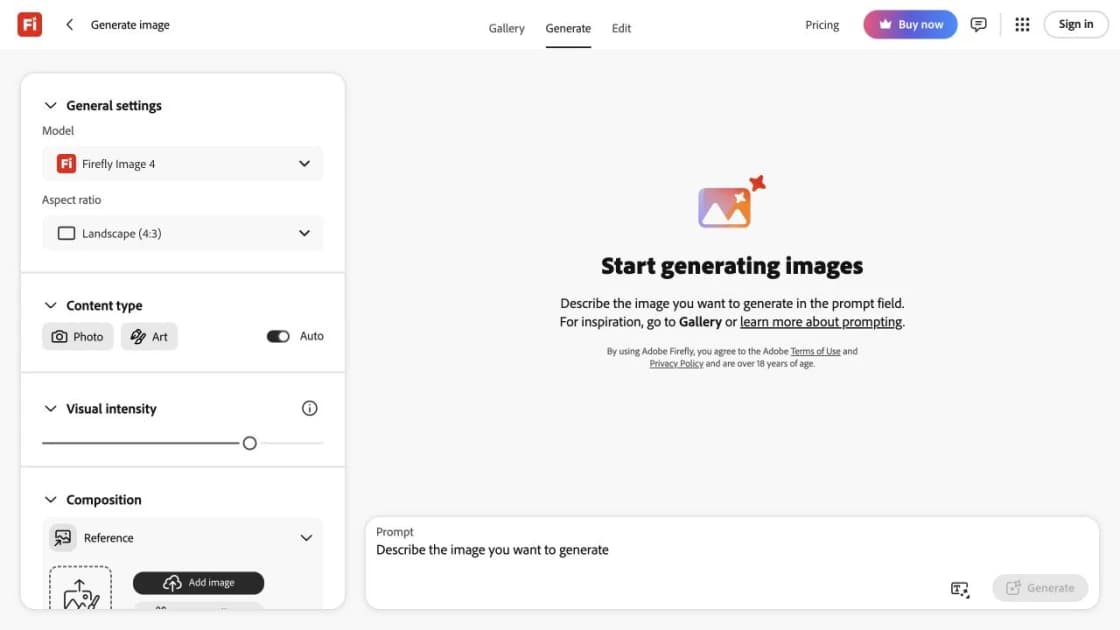
Cover: the complete English Adobe Firefly Image 4 interface, captured signed out on 4 October 2026 with an empty prompt and no uploaded or generated content; proportionally resized only. It identifies the product entry point and does not prove account eligibility or Adobe endorsement.
Adobe product screenshot(s) reprinted with permission from Adobe. Adobe and Adobe Firefly are either registered trademarks or trademarks of Adobe in the United States and/or other countries.
Further reading: Understand service access restrictions · Build a reliable AI workflow
Sign up to experience all premium features at no cost.
*Available only to new users. Each user is limited to one trial.