Start your 3-day free trial
Sign up to experience all premium features at no cost.
*Available only to new users. Each user is limited to one trial.
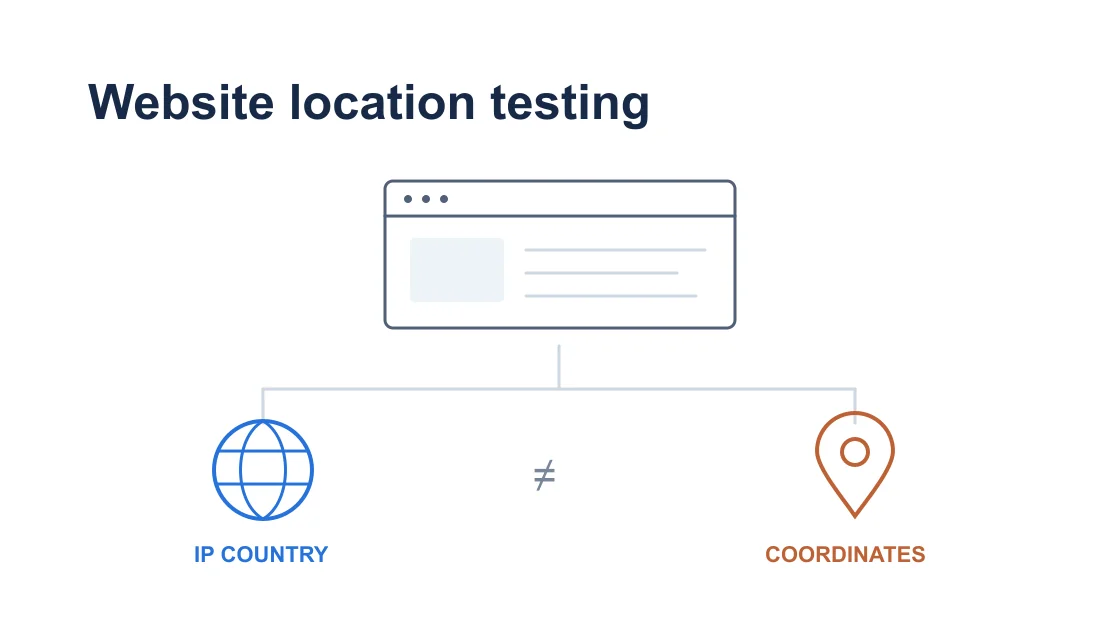

To test your website from different countries, change the request's network exit for IP-based behavior and test browser location separately. Keep language, cookies, account region, and cache conditions controlled, then compare your own site's actual result with a written expectation. This workflow is for a site you own or are authorized to test.
Key Takeaways:
- An IP location and a browser-reported coordinate are different inputs.
- Change one variable per case and document the site's rule before testing.
- Verify the available network exit before inspecting the same page.
- A VPN test does not represent every ISP, city, device, or user in a country.
Write down the page, environment, and expected behavior before selecting a country. For example, your site may suggest a language from the request's IP country while respecting a previously chosen language. Another site may use an account preference for currency and ignore the IP once a user signs in. These are different tests even if both change what appears on screen.
Specify the input your implementation uses: IP country, browser language, stored preference, account region, or browser geolocation permission. If several inputs compete, document their expected precedence. Without that rule, a changed page is only an observation; it cannot demonstrate correctness.
For an actual network-exit comparison, AethoVPN can supply a different route from the supported computer running your browser. Connect, enable global mode, and select a currently available position that meets the test case. Use the Windows package or Debian/Ubuntu x64 package; on Mac, obtain a VPN client configuration through the setup guide with Pro or Premium.
The location list in the app is the availability check; do not assume an arbitrary country or city can be selected. This method changes the network exit, not GPS, a residential ISP, or the visitor's legal eligibility. For a new testing account, start the 3-day free Pro trial, available once per user, and check the location list before planning further tests.
Keep the VPN connection constant while establishing the remaining baseline. If your Mac has an existing proxy, inspect the configured Mac proxy path so a second routing mechanism does not silently alter the experiment. Do not remove required organization settings without permission.
Create a small case sheet with a unique identifier for each comparison. Use a staging environment where possible, with a test account and harmless data. Obtain permission for any production test and avoid real payments, customer records, message delivery, or changes to customer entitlements.
Record the browser version, device type, page URL, login state, chosen language, consent state, and relevant site cookies or storage. Preserve a clean browser profile for the baseline, but remember that private browsing is not proof that every signal, cache, or account condition is neutral.
| Input | Hold fixed for the IP case | Test separately when needed |
|---|---|---|
| Network exit | Record observed IP and country | Another available exit |
| Browser language | Same ordered language list | A different language preference |
| Site preference cookie | Same documented value or clean state | A saved manual preference |
| Account region | Same authorized test account | A separate controlled account case |
| Browser coordinates | Same permission and override state | Allowed, denied, or emulated location |
| Cache conditions | Same documented cache policy | Fresh and cached response behavior |
For IP geolocation testing, start with the site behavior that is supposed to depend on the request's IP. BrowserStack's documentation treats a geographic network exit as a testing dimension for region-dependent websites. Do not copy its service's location coverage into claims about your VPN.[1]
Record expected and observed values separately. An empty observation field means the case has not run; leave it empty rather than filling a plausible screenshot or sample IP. A test report should make it possible for a colleague to repeat the same case with the same non-IP conditions.
If general browser or device connectivity is uncertain, follow the device and app troubleshooting order first. Website localization testing needs a stable browser request before a regional mismatch can be interpreted.
Open the IP and country check for your current connection from the same browser after the route is established. Record the observation and timestamp, then load the exact page under test. The VPN location name is an intended route; the lookup is an observation about that browser's current public exit.
Where you control the site's diagnostics, compare the application's resolved country with the approved request or edge logs. Different geolocation databases can label the same address differently. Treat a discrepancy as an input-mapping question before concluding that the page template or locale selection is broken.
Do not log an entire production request merely to obtain the country field. Use your site's approved diagnostic view and retain only information needed for the case. Public IP addresses and account details can be identifying, so keep sensitive evidence in the authorized test record.
Load the same URL and inspect the behavior defined in Step 1. Capture the actual selected language, displayed regional option, or other harmless field. Avoid making a purchase to “prove” a country rule; a page-state observation is usually enough for presentation logic, while authorization requires its own approved test.
If the IP differs from the intended route, use the VPN connection verification steps before interpreting the website. If the route works but country labels disagree, the VPN country-detection explanation helps separate database attribution from connection failure.
Repeat with a second currently available exit only after recording the first case. Keep language, account, cookies, and permission states unchanged. A controlled difference supports the limited conclusion that this site's response changed with that observed exit under those conditions.
Run browser-location cases separately from IP cases. Chrome DevTools Sensors can override coordinates exposed through the browser's geolocation behavior; it does not move the request's network exit. BrowserStack also distinguishes geographic testing inputs rather than treating all location mechanisms as one setting.[2][3]
For a Chrome test, open DevTools, open the command menu, select the Sensors panel, and choose a documented location or custom coordinates. Use coordinates appropriate to your authorized test case, and record whether the site was granted location permission. Verify the result in your own site's diagnostic display instead of assuming that selecting a preset proves the application consumed it.[3]
Compare an allowed-location case with a denied-permission case if your website uses geolocation. The expected result might be a fallback to IP country or a manual location selector. Document which fallback your implementation promises; do not treat permission denial as a VPN failure.
Keep the network exit unchanged during this sequence. If IP country remains constant while coordinates change and the page follows coordinates, you have isolated a browser-location input. You have not simulated a physical GPS receiver, local cellular coverage, or every behavior of a real phone.
When finished, remove the override and restore the baseline permission state deliberately. An unnoticed Sensors preset can contaminate later cases on the same debugging session. For tests using another browser or device, follow that platform's official location-testing support instead of assuming the Chrome control is universal.
Return to the written precedence rule when the page looks unexpected. A stored language preference may intentionally take priority over IP country. The request's Accept-Language values describe browser preferences; they do not independently establish physical location. Check the language your application actually chose rather than inferring it from the browser's UI language.
Inspect the site preference without erasing all browser data. A new authorized test profile can isolate stored choices, while a second case preserves them to test their intended precedence. Record the consent state because it may affect whether a preference is saved at all.
Compare logged-out and logged-in behavior only as separate cases. An account's region can remain fixed after the IP changes, which may be correct by design. The geographic restriction overview provides context, but changing IP does not itself establish account eligibility or permission to use a third-party service.
For a cached response, ask the responsible developer or CDN owner which inputs belong in the cache key and which response was served. A hard refresh alone cannot prove that all upstream caches recomputed the region. Compare fresh and cached cases using the site's documented test controls, without modifying production cache policy as part of a browser experiment.
If changing multiple inputs is unavoidable, label the case exploratory and avoid a single-cause conclusion. Then design a smaller follow-up with one changed input. This distinction keeps an interesting visual difference from becoming an unsupported bug report.
Each completed case should contain the authorized scope, environment, timestamp, browser and account baseline, observed network exit, coordinate/permission state, expected result, actual result, and sanitized evidence. Name the variable changed relative to the baseline. Include the implementation's country mapping if it differs from the external IP check.
Use a result such as “page language matched the IP rule for these two observed exits while other inputs remained fixed.” Avoid “the website works in every country” or “all local users see this version.” One VPN exit cannot represent every local ISP, residential address, city, device configuration, account, or accessibility setting.
If the needed location is absent from the available list, mark that case unexecuted. Use an authorized testing service with suitable documented coverage or an authorized colleague in that environment when broader acceptance requires it. Do not relabel a nearby exit as the requested country or infer an untested result from a screenshot.
A failure should identify which contract was violated: wrong input attribution, incorrect precedence, stale cache, bad localization, or browser-location handling. Attach only the minimum evidence needed for reproduction, and route it to that subsystem's owner. If you cannot identify the consumed input, report an observation and missing diagnostics rather than inventing a root cause.
After the run, restore temporary browser permissions, coordinate overrides, and recorded proxy changes. Keep the approved test record and remove any harmless test data through the application's supported controls. The final deliverable is a reproducible result for the cases you ran, with unexecuted cases visibly distinguished.
The network exit and browser-provided coordinates are different inputs. A VPN changes the request route; a coordinate override tests the browser location API without moving that route.[3]
Your site may prioritize a saved preference, browser language, or account setting over IP country. Compare the actual result with the documented precedence before calling it a failure.
Private browsing can separate some stored state but does not erase the current IP, browser language, or all external cache behavior. Record those inputs explicitly rather than treating a private window as a neutral baseline.
An account-region rule may intentionally remain stable across network exits. Use an authorized test account and a separate account case to verify that behavior without changing a real customer's eligibility.
A browser refresh does not prove that an upstream cache changed its input or response. Inspect the site's approved cache diagnostics and compare the appropriate documented test cases.
Leave the case unexecuted and select an authorized testing method with suitable coverage. A nearby location is a different case; do not present it as evidence for the missing country.
One observed exit validates a narrow case under your recorded conditions. Broader acceptance needs additional networks, devices, accounts, languages, and permission states appropriate to the website's requirements.
Sources checked 6 October 2026.
Sign up to experience all premium features at no cost.
*Available only to new users. Each user is limited to one trial.